Have you ever watched a YouTube video and thought “Is this channel actually making money?”
Maybe you want to check a competitor in your niche. Or you want to see if a creator you like has crossed the monetization mark. Or maybe you just want to check your own channel from the outside.
Whatever your reason you are in the right place.
In this guide, I will show you exactly how to check if a YouTube channel is monetized in just a few seconds. I will also explain what monetization actually means, why it matters, and how our free tool makes the whole process super easy.
No login needed. No complicated steps. Let’s get into it.
This article is a part of our complete YouTube Monetization for Beginners in India 2026 step by step guide
What Does “Monetized” Mean on YouTube?
Before we check anything, let’s quickly understand what monetization actually means.
When a YouTube channel is monetized, it means the channel has been approved by YouTube to earn money. This happens through something called the YouTube Partner Program (YPP).
Think of it like this YouTube checks if your channel is big enough and follows all their rules. If it does, YouTube gives you permission to run ads on your videos and earn money from them.
To join the YouTube Partner Program, a channel needs to meet these basic requirements:
- At least 1,000 subscribers
- At least 4,000 watch hours in the last 12 months OR 10 million Shorts views in the last 90 days
- Follow all of YouTube’s monetization policies
- Have a Google AdSense account linked
One thing that confuses a lot of creators here Shorts watch time does not count toward the 4,000 hour requirement. Shorts have a completely separate path. If you post mainly Shorts and want to understand exactly how that affects your monetization eligibility, read our full breakdown on does YouTube Shorts watch time count toward monetization.
Once approved, a channel can earn money from ads, memberships, Super Thanks, and more.
Simple enough, right? Now let’s look at why you might want to check this for any channel.
Why Would You Want to Check If a Channel Is Monetized?
Good question. Here are the most common reasons people check this:
- You want to study successful channels — If a channel in your niche is monetized, that means their content strategy is working. You can learn a lot from them.
- You are a brand looking for creators — Before reaching out to a YouTuber for a collaboration or sponsorship, you want to know if they are serious enough to be in the Partner Program.
- You want to know how much a channel earns — Not the exact number, but a rough estimate. This helps you understand how profitable a certain niche really is.
- You want to check your own channel — Sometimes creators just want to see how their channel looks from the outside.
All of these are totally valid reasons. And checking is easier than you think.
How to Check If a YouTube Channel Is Monetized with 3 Easy Methods
There are three ways to do this. I’ll start with the easiest and most accurate one.
Method 1 : Use the Free Toolbil YouTube Monetization Checker (Best Method)
The fastest way to check YouTube channel monetization status is to use our free YouTube Monetization Checker.
You don’t need to create an account. You don’t need to install anything. Just paste a channel URL and you get your answer in seconds.
Here’s how to do it step by step :
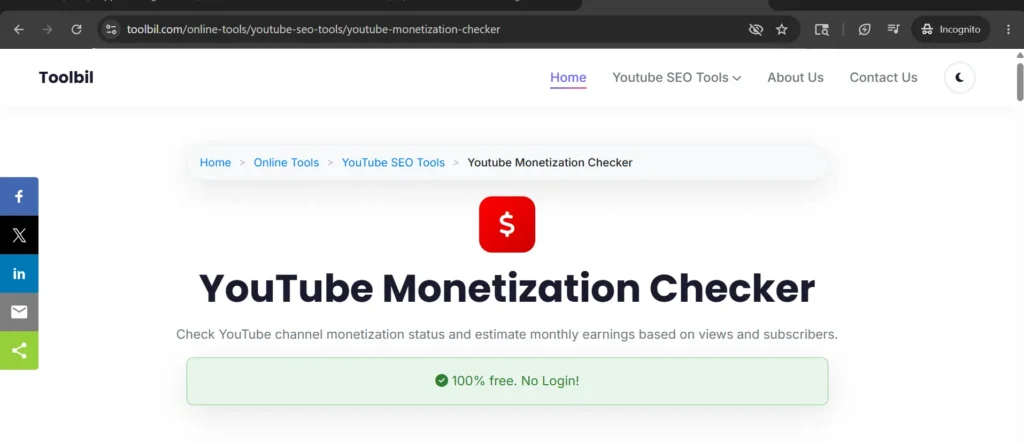
Step 1 : Open the Toolbil Monetization Checker
Go to toolbil.com ->YouTube Monetization Checker. The page will load with a simple input box. That’s it. No signup, no pop ups.
Step 2 : Copy the YouTube Channel URL
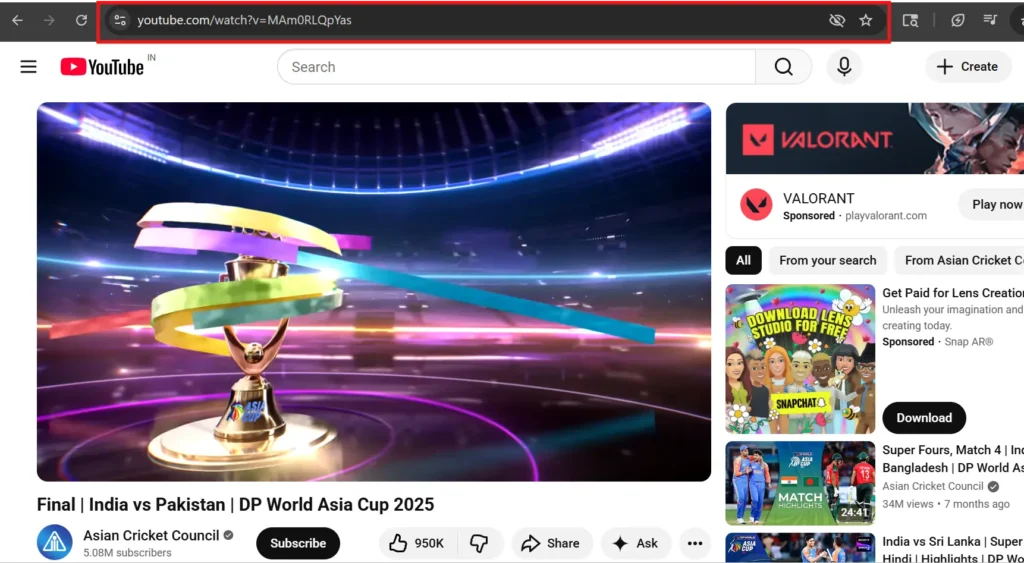
Open YouTube in another tab. Go to the channel you want to check. Look at the web address bar at the top of your browser that’s the channel URL.
It will look something like this:
https://www.youtube.com/@channelnamehttps://www.youtube.com/channel/UCxxxxxxxx
Click on that address and copy it (Ctrl+C on Windows, Cmd+C on Mac).
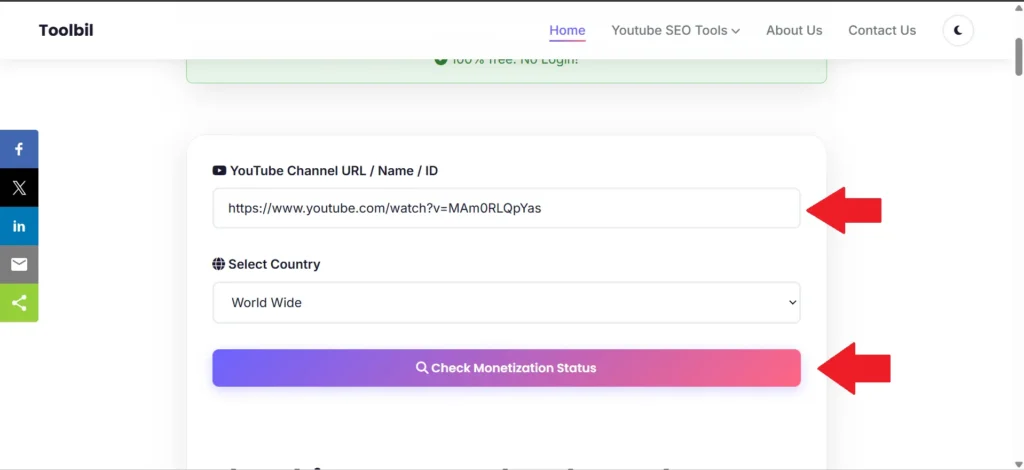
Step 3 : Paste the URL and Click Check
Go back to the Toolbil tool. Paste the channel URL into the input box (Ctrl+V or Cmd+V). Then click the Check Monetization Status button.
Step 4 : See Monetization Results
In just a few seconds, you will see a full report on that channel. You’ll know right away if the channel is monetized or not.
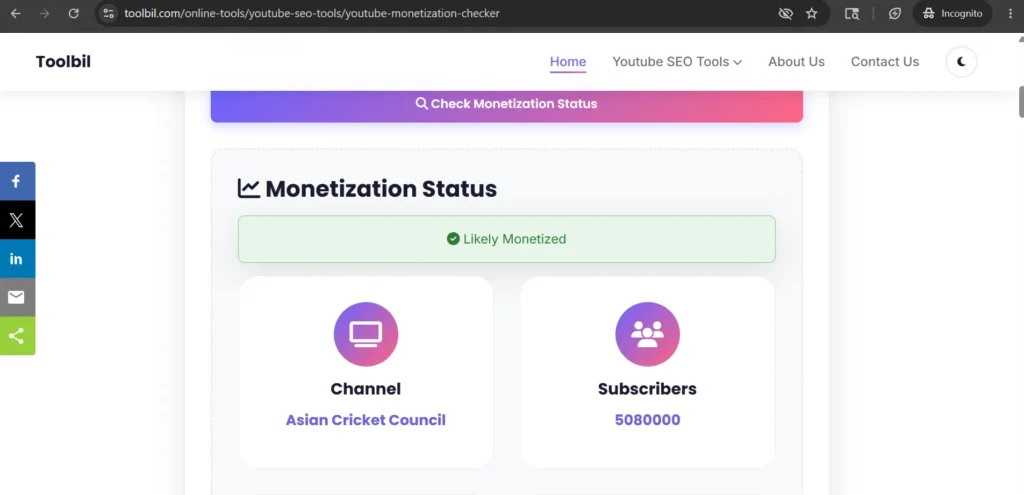
💡 Helpful tip: Once you know a channel is monetized, you can dig even deeper. Use our YouTube Video Data Extractor to see the exact tags and keywords that channel uses on their best performing videos.
Method 2 : Look for Clues Directly on YouTube
You can also check without any tool just by looking at the channel on YouTube. These are not 100% confirmed results, but they are strong clues.
Here’s what to look for:
- Ads playing on their videos : If you see an ad before or during a video, that channel is almost certainly monetized. Non monetized channels can’t run ads.
- A “Join” button next to Subscribe :This is the Channel Memberships button. Only channels in the YouTube Partner Program can have this.
- A “Thanks” button below videos : This is the Super Thanks feature. Again, only YPP members can use it.
- A merchandise shelf below videos : If you see products listed below a video, the channel is monetized.
The downside of this method? Some creators turn ads off on certain videos. Or they might have memberships disabled. So you could look at a monetized channel and see none of these signs.
That’s why the Toolbil YouTube Monetization Checker is more reliable it checks the actual channel data, not just what you can see on screen.
Method 3 : Check Your Own Channel via YouTube Studio
This method only works for your own channel. You can’t use it to check someone else’s.
Here’s how:
- Go to studio.youtube.com and log in.
- In the left menu, click on Earn (sometimes called Monetization).
- You’ll see your current status either “Not eligible yet”, “In review”, or “Likely Monetized”.
That’s it for your own channel. But if you want to check any other channel, you’ll need Method 1.
What Information Does the Toolbil Tool Show You?
Most free tools just tell you “yes” or “no.” Our YouTube Monetization Checker gives you a lot more than that.
Here’s what you get in your results:
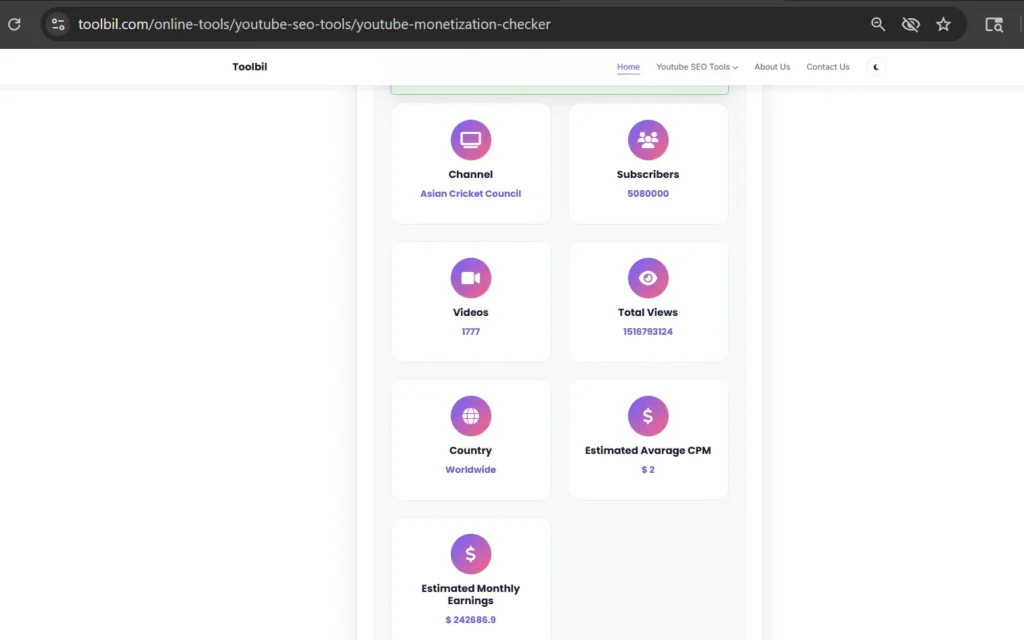
- Monetization Status : A clear “Monetized” or “Not Monetized” result. No guessing.
- Estimated Monthly Earnings : A realistic earnings range based on the channel’s niche, view count, and average CPM rates. Not the exact amount, but a solid ballpark figure.
- Subscriber Count : How many subscribers the channel currently has.
- Total Videos Published : How many videos they have uploaded in total.
- Channel Creation Date : When the channel was first created. This helps you understand how long it took them to grow.
And remember : all of this is completely free. No account, no credit card, no tricks.
YouTube Partner Program Requirements in 2025
Want to get your own channel monetized? Here’s exactly what you need.
YouTube actually has two levels of the Partner Program now. Here’s how they compare :
| Requirement | Standard YPP (full) | Expanded YPP (fan funding only) |
|---|---|---|
| Subscribers needed | 1,000+ | 500+ |
| Watch hours (12 months) | 4,000 hours | 3,000 hours |
| Shorts views (90 days) | 10 million | 3 million |
| Can run ads on videos | ✅ Yes | ❌ No |
| Channel memberships | ✅ Yes | ✅ Yes |
| Super Thanks | ✅ Yes | ✅ Yes |
The expanded YPP tier is newer. It lets smaller channels earn through memberships and fan donations before they hit the 1,000 subscriber mark. But to run actual ads on your videos, you still need the full Standard YPP.
You can check the official YouTube Partner Program requirements page for the most up to date information.
How to Use This to Grow Your Own Channel
Knowing that a channel is monetized is useful. But knowing what to do with that information is even better.
Here’s how to turn it into action:
- Find the keywords they rank for : Once you’ve identified a monetized channel in your niche, use our free YouTube Tag Generator to discover the kind of keywords that work in that niche.
- Study their thumbnails : Monetized channels have usually figured out what kind of thumbnails get clicks. You can download any thumbnail for free using our YouTube Thumbnail Downloader and use it as inspiration for your own.
- Find out what brands would pay : Wonder what a monetized creator in your niche earns from sponsorships? Use our YouTube Sponsorship Calculator to estimate brand deal rates based on subscribers and views.
Frequently Asked Questions
Can I check someone else’s YouTube channel monetization status?
Yes, absolutely. The Toolbil YouTube Monetization Checker works for any public YouTube channel not just your own. Just paste their channel URL and you’ll get the result right away.
Is this tool really free? Is there a catch?
It’s completely free. No account needed, no credit card, no hidden charges. You can check as many channels as you want without any limits.
How accurate are the results?
The monetization status check is very accurate for most channels. It looks at real channel signals to determine YPP status. The estimated earnings are a realistic range not an exact figure, since actual earnings depend on the viewer’s country, niche CPM rates, and how many ads the viewer watches.
What if a channel shows “not monetized” but I can clearly see ads on their videos?
This can happen in rare cases usually when a channel was very recently approved and the data hasn’t updated yet. If you see ads playing on a video, that channel is monetized. The tool result will catch up within a day or two.
Will the channel owner know I checked their monetization status?
No. Checking a channel on Toolbil is completely private. The channel owner gets zero notification. You can check any channel without them ever finding out.
Can I check a YouTube Shorts channel too?
Yes. Channels that mainly post YouTube Shorts can also be in the Partner Program. The tool checks the overall channel status, so it works for Shorts channels, long form video channels, and mixed channels too.
How much does a small monetized YouTube channel actually earn?
It varies a lot by niche. A small channel with around 1,000 to 5,000 subscribers might earn anywhere from $5 to $50 per month from ads. Finance and tech channels earn much more per view compared to entertainment or vlog channels. The more views you get, the more you earn it’s that simple.
Ready to Check a YouTube Channel?
Now you know exactly how to check if a YouTube channel is monetized and you have three different ways to do it.
The fastest and most detailed way is always the Toolbil YouTube Monetization Checker. It’s free, instant, and gives you way more information than just a yes or no answer.
Go ahead and try it right now paste any YouTube channel URL and see what you get. And while you’re at it, explore all our free YouTube SEO tools to help you grow your channel faster.

Prerna T
Prerna is the founder of Toolbil with 5+ years of experience in tech startups, SaaS products, and digital tools. She has published 2 IEEE papers and worked as a freelance tech writer for reputed journals and magazines. She writes about AI tools, software platforms, automation, and emerging technology trends.